
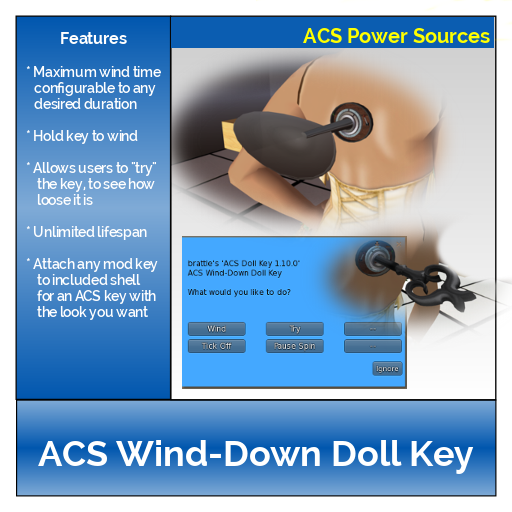
 The ACS Wind-Down Doll Key is designed for clockwork-style dolls. Like a Battery, it provides a limited source of power for the doll. As the key’s spring unwinds, the doll’s motion and speech will be gradually limited, until it stops completely. To reactivate the doll, or keep it active, the key must be wound (by clicking on it, then selecting the desired option from the menu). The key cannot be “recharged” using a Charger Platform.
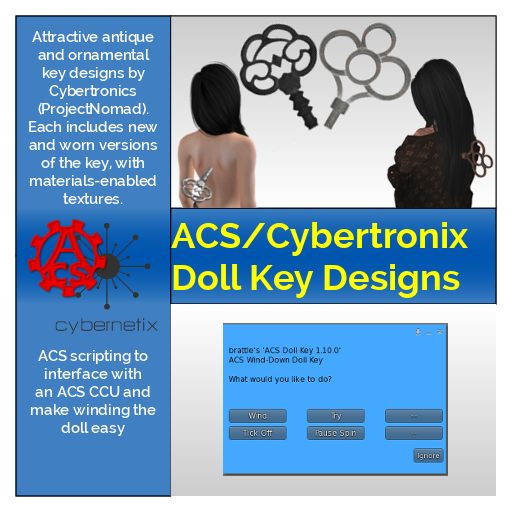 Through a partnership with Cybernetix, we are now able to offer two styles of attractively designed keys, each available in three materials. Buying one key actually gives you two versions: a “new” one and a “worn” one. Pick the one you prefer!
Customizing the Key’s Functions
Many of the Doll Key’s features can be customized by editing the “keysettings” notecard inside the key. (Only the doll itself can do this; the Workbench does not provide access to these features). Among the customizable features are:
- Amount of active time provided by a full winding
- Number of winds required to fully wind the key
- Volume of ticking sounds
- Whether the doll may wind its own key
See the comments in the notecard for instructions on changing these and other configurable settings.
Customizing the Key’s Appearance
You can also customize the appearance of your ACS Doll Key. ACS recognizes that a doll should have a pretty key that suits its personality. Therefore, when you purchase a basic ACS Doll Key, it also came with a Doll Key Shell. This Shell allows you to combine the functionality of the ACS Doll Key with the looks of a pretty key from another source. The following tutorial will step you through the process, but it will probably help if you are already familiar with editing and linking objects in Second Life.
Before beginning, make sure your pretty key:
- Has no scripts in it, and
- Is not rotating
If you buy a key from another vendor to use for this purpose, make sure it either contains no scripts, or is modifiable so you can remove the scripts. We recommend its shaft be no thicker than 0.02m and its length be between 0.2 and 0.3 meters, but this is just a suggestion about what we think looks best.
Once you have your pretty key and the ACS Doll Key, combine them using this procedure:
- Rez your pretty key in-world.
- Rez the ACS Doll Key Shell near the pretty key. All you will see is three perpendicular axes.
- Rotate your pretty key so that the shaft is parallel to the BLUE axis of the Doll Key Shell, and the axis points toward the HANDLE of the key. If the blue axis points upward (as it usually will), then your pretty key should be oriented with the handle pointing up, as if it were going to plug into a slot in the floor.
- Right-click the ACS Doll Key Shell and click Edit. You will notice that you see the outline of a partial cone surrounding the blue axis.
- Click “Object” in the build panel and note the position of the key. (You may want to adjust the position to integer values to make this easier. You can also click the C button to copy the whole position.)
- Click the pretty key and move it to the same position as the ACS Doll Key Shell. It should be partly surrounded by the invisible cone. It’s okay if the new key is longer or shorter than the original ACS Doll Key, and it doesn’t need to be completely surrounded.
-
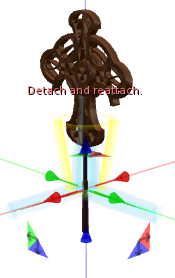
Good key position
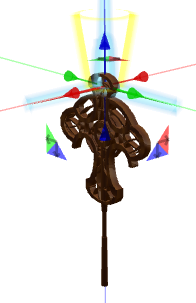
Wrong key position
If the axes are not near the point where the key should appear to enter the doll, move the key along its axis until they are.
- Be sure the pretty key is still selected. Hold down the shift key and click the remains of the ACS Doll Key Shell as well, so that both the pretty key and the invisible cone are selected. IMPORTANT: You must select the pretty key?first,?then the ACS Doll Key.
- In the edit panel, click Link.
- The cone should now be outlined in yellow, and the pretty key in blue. If it isn’t, you’ve done something wrong.
- Take the new composite key (or a copy of it) into your inventory, and attach it (generally to your spine).
- Adjust the position of the key to your liking.